
No sprites: drawing a whole Godot game in code
Every dog, lamppost, sidewalk tile and cutscene in Path of Leash Resistance is drawn in _draw(). Here's how to keep procedural vector art fast and testable in a web build.
- godot
- rendering
- performance
- testing
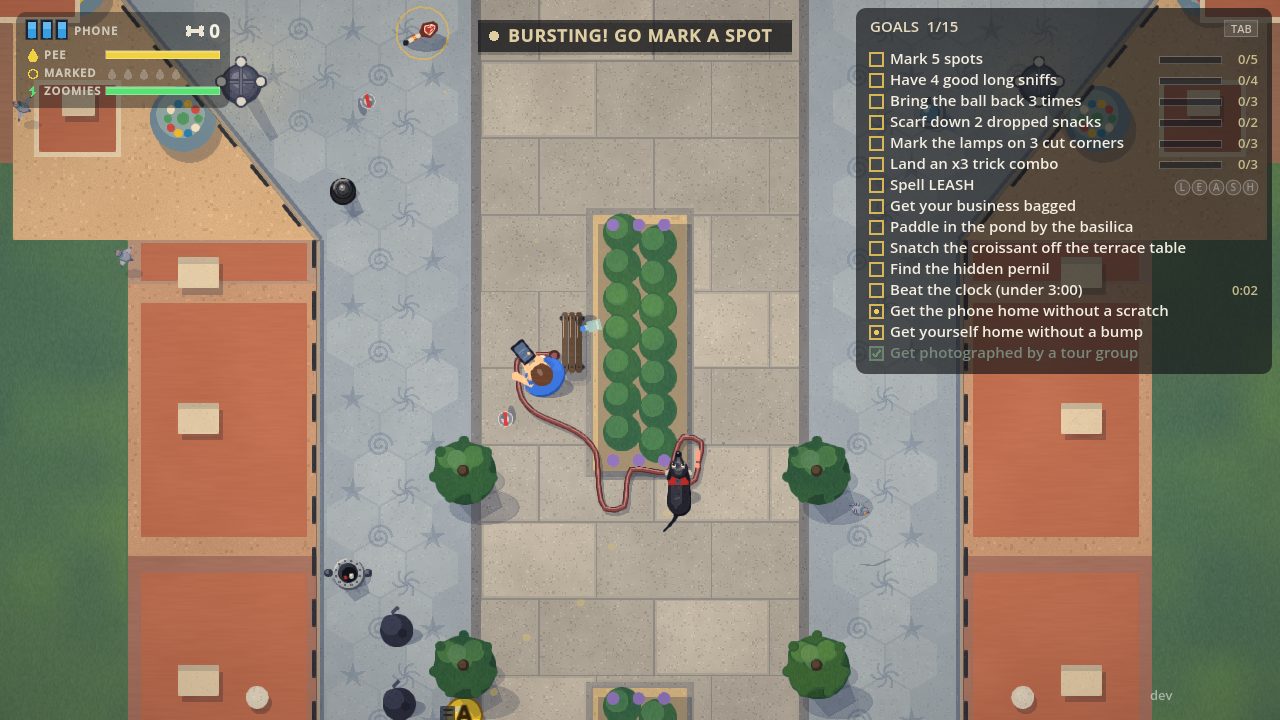
Apart from two font files (BricolageGrotesque.ttf and Inter.ttf) and a generated icon.png, Path of Leash Resistance the game itself loads no image files. Every dog, passerby, Barcelona storefront, panot sidewalk tile, and side-on chase film is drawn procedurally in GDScript inside _draw(), sharing one Trencadís palette defined in hud/ui_kit.gd.
Drawing everything in code keeps the repo tiny and makes levels easy for coding agents to author and inspect in plain text diffs. The catch is performance: if you draw a bustling Eixample intersection with naive draw_circle() and draw_rect() calls in a browser, frame times fall apart fast.
The web build bottleneck in GL Compatibility
Path of Leash Resistance ships on the web using Godot 4’s GL Compatibility renderer because that’s what Godot’s web export requires. In Compatibility, convenience drawing calls aren’t automatically merged the way you might expect: every draw_circle() and draw_colored_polygon() becomes its own draw call, and simply alternating a draw_rect() with a draw_line() flushes the batch and starts another.
On a Barcelona street full of four-petal panot tiles, tree canopies, traffic, and crowds, those draw calls are what the web build pays for.
ShapeBatch: one draw call, pixel-identical output
To keep the convenience of _draw() without paying per-shape draw-call overhead, I built systems/shape_batch.gd (ShapeBatch). It merges runs of filled circles, rectangles, wide lines, and triangulated polygons into one flat triangle list and submits them in a single call.
Two details make it safe to drop into existing drawing functions:
- It acts as a drop-in canvas.
ShapeBatch.new(self)exposesdraw_circle,draw_rect,draw_line,draw_colored_polygon, anddraw_set_transformwith Godot’s normalCanvasItemsignatures. Any call it doesn’t handle natively—outlined rects, hairlines of width-1, text, or arcs—flushes the queued triangles and forwards straight to the underlying canvas so draw order stays intact. - It reproduces the engine’s math down to the pixel.
ShapeBatchbuilds a 64-segment unit fan using the same 32-bit float order as Godot’sRendererCanvasCull::canvas_item_add_ellipse, moves it with a nativeTransform2Dmultiply, triangulates polygons throughGeometry2D.triangulate_polygon, and even rounds line colors to half-floats (_as_half) to match how the renderer stores primitive per-point colors.tests/test_shape_batch.gdrenders both paths side by side and checks that they match pixel for pixel.
For dense scenes like lawns, tiled plazas, or distant crowds, turning on lod adapts circle resolution from a LOD_SAG budget of 0.15 px—8 sides for a 2 px dot, 19 at 10 px, and the full 64 segments only once a circle passes ~110 px—where a lawn of small discs at a fixed 64 sides each would be most of a million vertices per redraw. Meanwhile, cached sidewalk layers like world/panot.gd (Panot.flor and Passeig de Gràcia’s hexagonal Panot.gaudi) record triangles once and replay them straight into the caller’s batch at zero extra draw calls.
Lighting without banding
Vector lighting is notorious for concentric rings if you stack flat alpha-blended discs or strips. Instead, soft lights go through explicit gradient helpers—ShapeBatch.glow for round pools, ShapeBatch.band for feathered strips, and IntroKit.vgrad for cutscene skies—while world/light_layer.gd batches every lit storefront and doorway fan across the street in one pass scaled by Game.lamp_glow(). Finally, hud/grade.gdshader dithers the output so slow twilight fades don’t step either, guarded by tests/test_soft_light.gd.
Testing procedural art like code
When your art is code, you can test rendering changes the same way you test physics:
- Deterministic frame clocks: Drawing functions never read
Time.get_ticks_msec(). They readAnimClock.msec(), which shot mode locks to the frame counter.tools/shot_sweep.shcaptures every walk and menu, plus the street at mobile sizes (844×390and390×844), andtools/shot_diff.pyproves a batching refactor changed zero pixels. - Physics-vs-visual surface checks: When grass, gravel, water, and sidewalk are all drawn in script, it’s easy for a visual patch to disagree with what’s underneath it.
tools/surface_map.shdumps colored dots showing what the physics engine reads at every point, andtools/surface_check.pycompares those zones against the rendered frame so a sidewalk drawn like sand or water gets caught automatically.